The token page

Click a Radar card, a search result, or paste a CA: you land on /token/<CA>. Everything you need to decide, then buy.
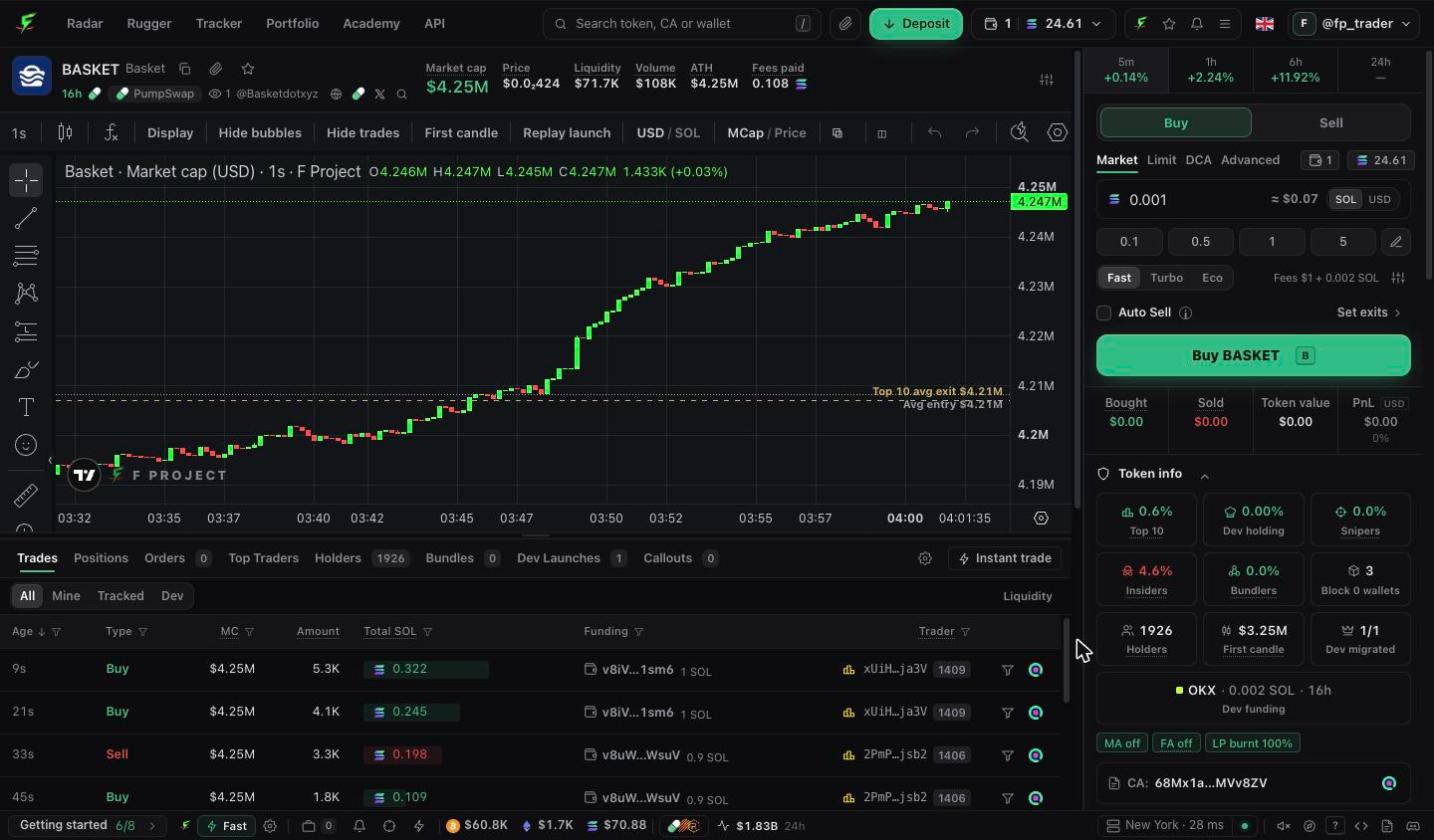
- 1Header: identity, links, customizable stats strip
- 2Chart buttons: Display, bubbles, First candle, Replay, USD/SOL, MCap/Price
- 3TradingView chart with your entry and TP/SL lines
- 4Buy / Sell panel
- 5Token info, Dev scanner, holders, pool, Block 0…
- 6Tables: Trades, Positions, Orders, Top traders, Holders, Bundles…
- 1Header + stats
- 2Chart
- 3Tables
- 4Order panel (see Buy & sell)
- 5Accordions: audit, dev, holders, pool, Block 0
The 4 checks before you buy
The Academy (level 7) sums up the page in four questions:
- The bundle: how many wallets bought in the creation block, and how much do they still hold? (Bundles tab, Block 0 accordion)
- The dev’s funding: who funded them, how much, how long before? (Dev funding, DevBox)
- The dev’s past launches: how many migrated, at what ATH? (Dev scanner, Dev Launches tab)
- Your position: already in? (Position strip, Positions tab)
Then: pick your size, tick Auto Sell, buy. → Buy & sell
The header
- Image, ticker, name, CA menu, watchlist star, age, launchpad, chips (Mayhem, boost, holder rewards, fee sharing, Paid, Cashback), viewers, links to Solscan, Pump.fun, X, “Search this contract on X”.
- Stats strip: Market cap, Price, Liquidity, Volume, ATH, Fees paid, Bonding (or Migrated). Hidden by default: Holders, Top 10, First candle, Dev funding. Customize this strip: drag to reorder, click to show/hide.
The chart
Full TradingView chart: drawing tools, indicators, settings. Your indicators, drawings (per token) and settings are kept on your account in this browser.
- Intervals: 1s, 5s, 15s, 30s, 1m, 3m, 5m, 15m, 30m, 1h, 4h, 6h, 12h, 1D, from the chart’s interval menu. The page always opens on 1s.
Buttons above the chart
| Button | Effect |
|---|---|
| Display ▾ | Lines and markers (see below). |
| Hide / Show bubbles | The trade bubbles on the candles. |
| Hide / Show trades | The tables under the chart. |
| First candle | Jumps to the coin’s first candle. |
| Replay launch | The first 10 seconds, slot by slot. |
| USD / SOL | Values in dollars or in SOL. |
| MCap / Price | Chart the market cap (default) or the price. |
| Pop out chart | Opens the chart in its own window. |
| Dock the Radar | The Radar next to this token. |
| Reset zoom |
Reference lines
- My entry (dotted green), or the average entry of a chosen wallet.
- Average entry (gray): follows the All / Dev / Tracked / Me filter.
- Top 10 holders exit (gold): average exit price of the N biggest holders (N set in the Holders tab, 1–50).
- Floor: ~28 SOL, the start of the pump.fun curve. A pump.fun token does not go below it.
- Your TP / SL lines: see Exits & TP/SL.
Display: lines and markers
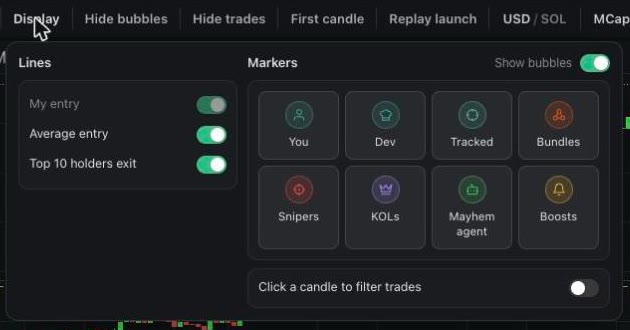
- 1Lines: My entry, Average entry, Top 10 holders exit
- 2Markers: You, Dev, Tracked, Bundles, Snipers, KOLs, Mayhem agent, Boosts
- 3Click a candle to filter trades
- Show bubbles (main switch), then per type: You, Dev, Tracked, Bundles (one letter per group), Snipers (off by default: buys in block 0/1 outside the creation bundle), KOLs, Mayhem agent, Boosts (buy-and-burn in the first 5 minutes).
- Bubble letters: Y you, D dev, T tracked, B bundle, S sniper, K KOL. Click a bubble = the list of wallets.
- Click a candle to filter trades: a short click filters the trade list to that candle (blue line). Click again, Esc or × to clear.
The tables under the chart
Drag the handle to set their height. The Trader tags gear picks which tags, app badges, funding and counters show. Instant trade opens a small floating buy/sell panel above the chart.
Trades
Each trade live: age, type, MC, amount, total SOL, funding (option), trader.
- Labels: Buy / Sell / Add / Created / Remove, “Dev buy x%”, B0 badge, “You · wallet”, Boost, Mayhem, KOL name.
- Whose trades: All, Mine, Tracked, Dev.
- Per-column filters (funnels): type, period (1m/5m/15m/1h), MC at the time of the trade, total SOL, funding source and age, a single wallet, trader tags (Your wallet, Dev, Tracked, Insider, Bundler, Sniper, Fresh wallet, Sold in under a minute, Top 10, Pro trader), bought via (F Project, Pump app, Axiom, GMGN, Bloom, Program).
- Loads 100 rows at a time as you scroll down.
Audit & Dev scanner (right column)
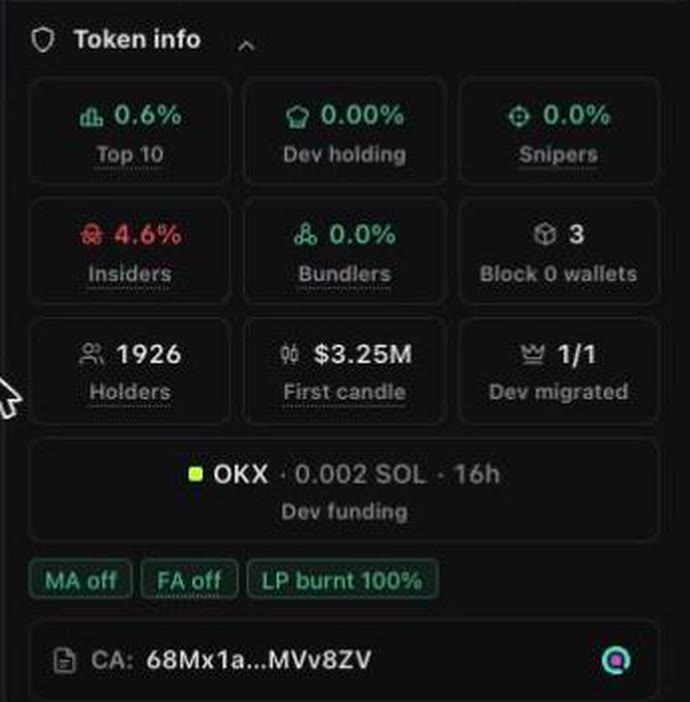
- 1Token info: Top 10, Dev, Snipers, Insiders, Bundlers, Block 0, Holders
- 2DevBox: CA, dev address, blacklist the dev, analyze in Rugger
- 3Dev scanner: funding, launches, migrations, best launch
| Accordion | Content |
|---|---|
| Token info | Top 10 (red > 40%), Dev holding (red > 5%), Snipers bought vs held (orange > 3%), Insiders (red > 3%), Bundlers (red > 3%), Block 0 wallets, Holders, First candle (MC at the end of the first 1 s candle), Dev migrated m/c, dev funding (mixer in red). Authorities: on pump.fun “Mint and freeze authority disabled by Pump.fun”, otherwise MA / FA on/off chips and LP burnt %. |
| DevBox | CA and dev address, blacklist the dev (their next launches disappear from your Radar), Analyze this dev in Rugger, Trace where their SOL came from. |
| Dev scanner | Funding, number of launches, migrations, best and latest launch, list of launches with ATH and Track / Wallet. |
| Holders | The first 100 buyers: still holding, added more, sold part, sold everything, and the top 5. |
| Holder sizes | Brackets $0–100, 100–1K, 1K–10K, 10K+. |
| Pool | Address, quote, swap fees (LP / pump.fun / creator split), liquidity. |
| Block 0 | Up to 12 wallets from the creation slot, and the Block 0 signature: wallets · SOL · % of supply, and how many launches in the last 7 days have the same signature (and how many did +100%). Open this signature → Rugger › Signatures. |
| Performance | Your trades, average entry MC, PnL. |
| Similar tokens | Live tokens with similar names. |
These are the same ideas as in the bot: Rugger Protection, Amount Signatures, Launch venues.
Special states
- Not tradable here yet: no pool indexed. The page opens on its own as soon as one is.
- This address is a wallet, not a token: Open wallet button.