Buy the Dip
Extra buys on a token you already hold. Up to 3 levels. Each level fires once.
On the rugger, open 💰 Buy Config → Buy the Dip. When you add a level, pick a kind:
| Kind | What you type | When it buys |
|---|---|---|
| 1 | A drop from the high, 1–99%, then a SOL amount | Market cap falls that far from its high |
| 2 | A minimum and a maximum sell size in SOL, then a SOL amount | Someone else sells inside that range |
The high is the token’s market cap in dollars, not the price of one coin. It stays put if the supply changes.
Auto-buy has to be on. Buy Only Once blocks these extra buys. Leave it off on this rugger if you want the adds. See 🔁 Buy Only Once.
A drop from the high
Level 1: -30% from the high → buy 0.5 SOL
Level 2: -50% from the high → buy 1.0 SOL
Level 3: -70% from the high → buy 2.0 SOL
You enter small on the copy. If the token falls, the matching level buys more, once. A 25% drop only fires a -20% level. It does not fire -40%.
If the token never comes back, you are averaging into a rug. Pair this with the 🛑 Max Loss Counter.
A sell in a SOL range
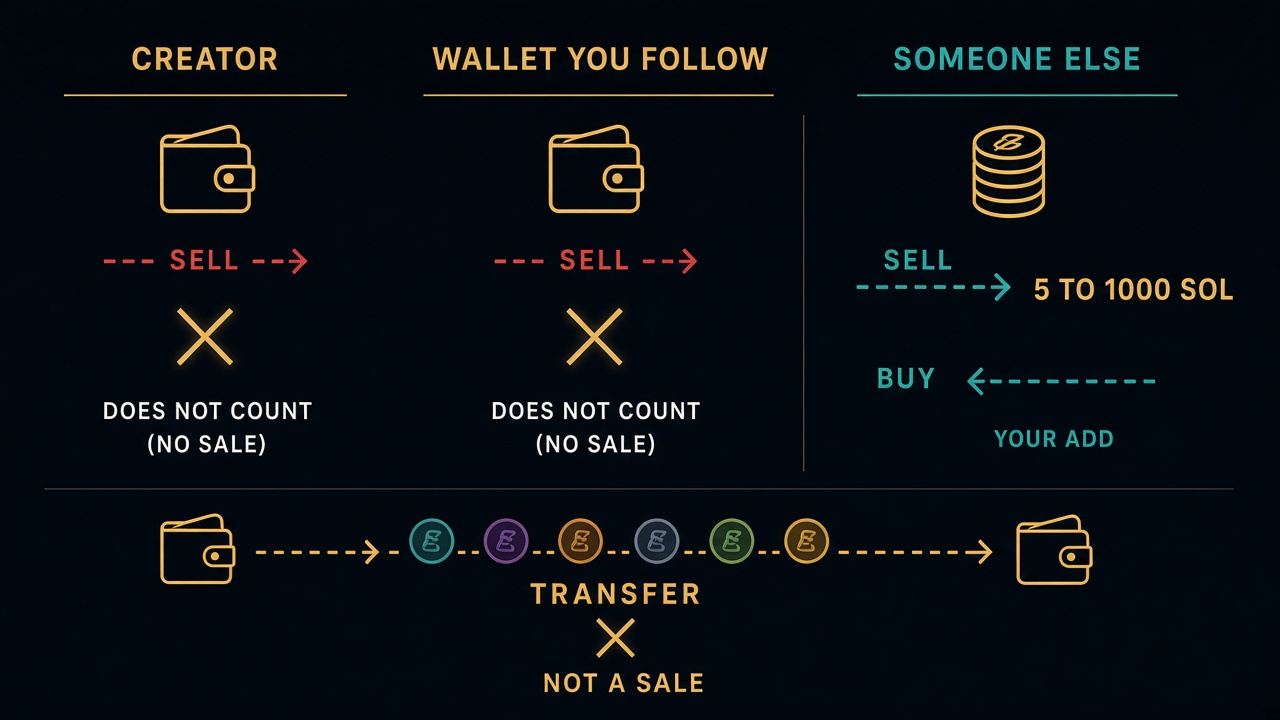
This is not a drop. It buys when another wallet sells the token for SOL, and the size of that sale sits between your minimum and your maximum.
Level 1: a sell of 5–1000 SOL → buy 0.01 SOLRanges on sell levels must not overlap.
These sales do not count:
- The creator of the token
- The wallet you follow (the mother, and the dev wallet this position is tracking)
- A transfer of tokens from one wallet to another. Moving supply is not a sale, even when the tokens are worth more than your minimum
A sale from some other wallet, paid in SOL, inside the range, buys your amount once.
Related pages:
- 💰 Buy Config — the first buy
- 🐋 Auto-Sell on Big Buy — the mirror: a big buy sells some of your bag
- 📈 Sell Config — take profit and a trail on the whole position