Radar

The Radar shows every Solana launch live, in three columns. You filter, read a card in two seconds, and buy in one click. Hotkey: R.
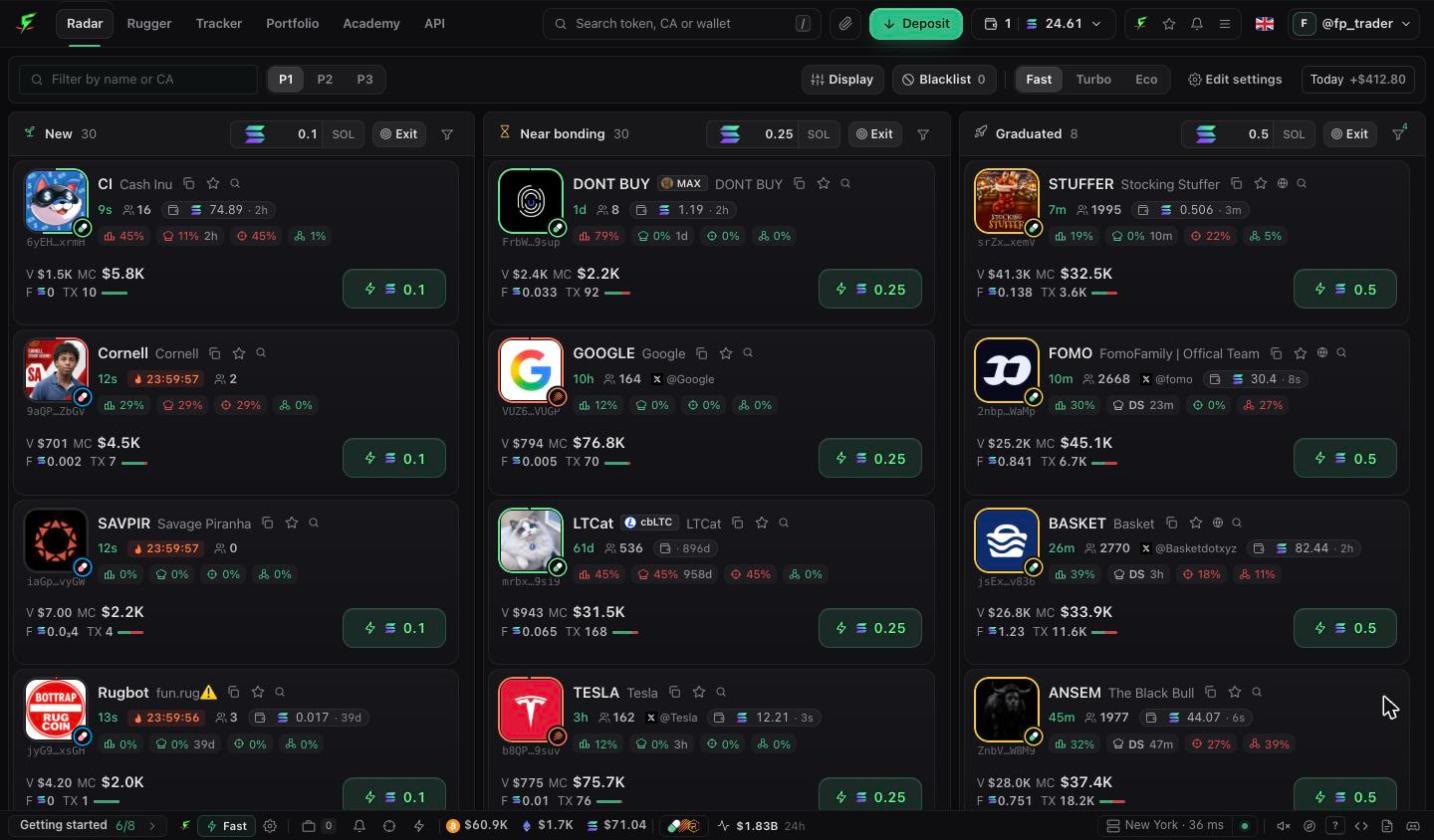
- 1Filter by name or CA
- 2Size presets P1 / P2 / P3
- 3Display · Blacklist · Speed mode
- 4Today: realized PnL for the day
- 5One-click buy size for the column (SOL or % of supply)
- 6Exit: TP/SL applied to every buy from the column
- 7Column filters
- 8Quick buy button
The three columns
| Column | Holds | Order |
|---|---|---|
| New | Freshly created tokens, still far from the end of their curve. | Newest on top. |
| Near bonding | Tokens close to the end of the curve, and those migrating. | By bonding %, migrations first. The order freezes for 4 s so cards do not jump under your mouse. |
| Graduated | Tokens that moved to their DEX pool (PumpSwap…). | By migration time. The age shown = time since migration. |
- Each column shows 30 cards max. If fewer than 10 live tokens pass your filters, the column is filled with older tokens (last 7 days) that pass too.
- Pause on hover: when your mouse is on a column, it freezes. The header shows “Paused · n new”. Move the mouse out, it resumes. There is no pause button.
- New cards flash when they arrive.
- On phone, a “Radar column” picker switches between columns.
Where the data comes from
Your column filters and your presets 1–3 are saved to your account: you get them on your other devices. After a reconnect, they are sent again on their own.
Read a card
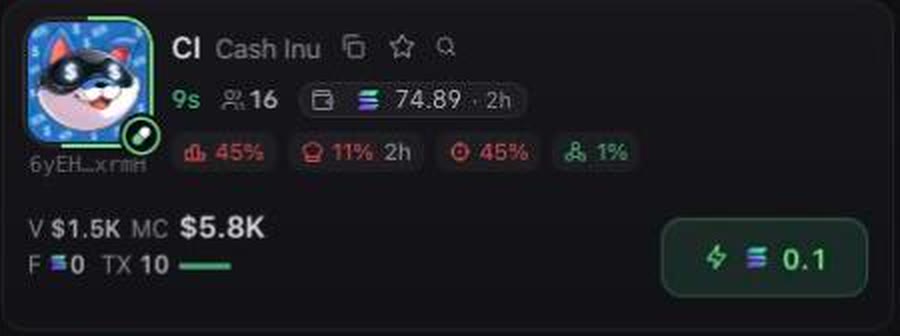
- 1Image + bonding ring (launchpad color, gold if migrated, red if Mayhem)
- 2Ticker, name, copy, watchlist star, dock next to the Radar, website, Telegram, X
- 3Age, holders, KOLs, dev creations and migrations, F Project viewers
- 4Dev funding: source, SOL amount, time before launch
- 5Audit pills: Top 10, Dev, Snipers, Insiders, Bundlers, Fresh
- 6V volume · MC · F fees · NB net buy 5 min · TX buyers/sellers
- 7Quick buy / Sell 100% / Snipe migration
The Academy method to read a card in two seconds: age and holders → dev funding and bundle share → volume, MC and fees.
| Item | What it means |
|---|---|
| Ring | Bonding progress. Hover: “Bonding n%”. |
| KOLs (star) | Number of KOLs who traded this coin. |
| Chef hat | Number of tokens the dev created. |
| Crown m/c | The dev migrated m of their c coins. |
| Eye | F Project members watching this coin right now. Green eye = wallets you follow that bought. |
| Megaphone | Member callouts on this coin. |
| Coins % | Holder rewards (total paid out, holders paid, last payout). |
| Split | Fee sharing (authority locked or editable, split). |
| Funding pill | Who funded the dev (exchange, mixer, labeled wallet), how much, how long before launch. Click = opens the dev’s wallet. |
| Top 10 / Dev / Snipers / Insiders / Bundlers / Fresh | % of supply. Red above your threshold (defaults: 40 / 5 / 5 / 10 / 8 / 30). “DS” = the dev sold everything. |
| Cashback | Token where part of the fees goes back to traders. |
| Paid | Paid DEX profile (hover: banner and boosts). |
| V · MC · F · NB · TX | Volume since launch, market cap (flashes green/red at ±1%), fees paid in SOL, 5 min net buy in $, transactions with buy/sell ratio. |
Big volume + tiny fees = faked chart, most of the time. Fees are the real measure of activity.
Buy from the Radar
Quick buy
The lightning button buys the column’s size, on all your active wallets, with the column’s exit strategy. No confirmation.
- Size per column: the field in the header. Each column keeps its own (defaults: 0.1 / 0.25 / 0.5 SOL).
- SOL ↔ % of supply: buys a percentage of the supply instead of a fixed amount. The card then shows the ≈ cost in SOL, live.
- P1 / P2 / P3 set all three columns at once: P1 = 0.1 / 0.25 / 0.5 · P2 = 0.25 / 0.5 / 1 · P3 = 0.5 / 1 / 2 SOL.
- Multiple wallets: the buy is split with a variance (default 15%) and a delay between wallets. See Wallets.
Possible messages: “Enter an amount.”, “Select at least one wallet.”, “Not enough SOL. Deposit to buy.”, “n wallet(s) skipped: not enough SOL.”.
Sell 100%
If you already hold the coin, the button becomes Sell 100% with the value of your bag.
Snipe migration
On a migrating token (curve complete, pool not open yet), the button becomes Snipe migration. It arms a server order that buys the column’s size at the first trade on the new PumpSwap pool. The order shows in your Orders. It runs even with the browser closed.
Exit strategy per column
The Exit button in the header opens the exits editor: “Every one-click buy from this column gets these exits.” The summary then shows under each buy button.
Ultra
In Display, Ultra makes the right half of each card clickable to buy, with no confirmation. A click anywhere else opens the token. An “Ultra” chip shows in the header while it is on.
Quick buy, Ultra, Snipe migration: no confirmation. Start with small sizes. To remove the buy buttons, turn on Hide buy buttons (this also turns off Ultra and Snipe migration).
Open a card: one click opens the token page. Cmd/Ctrl+click or middle-click opens it in a new tab and never buys.
Filters
Filters button on each column (the badge counts active filters). An empty field = no limit.
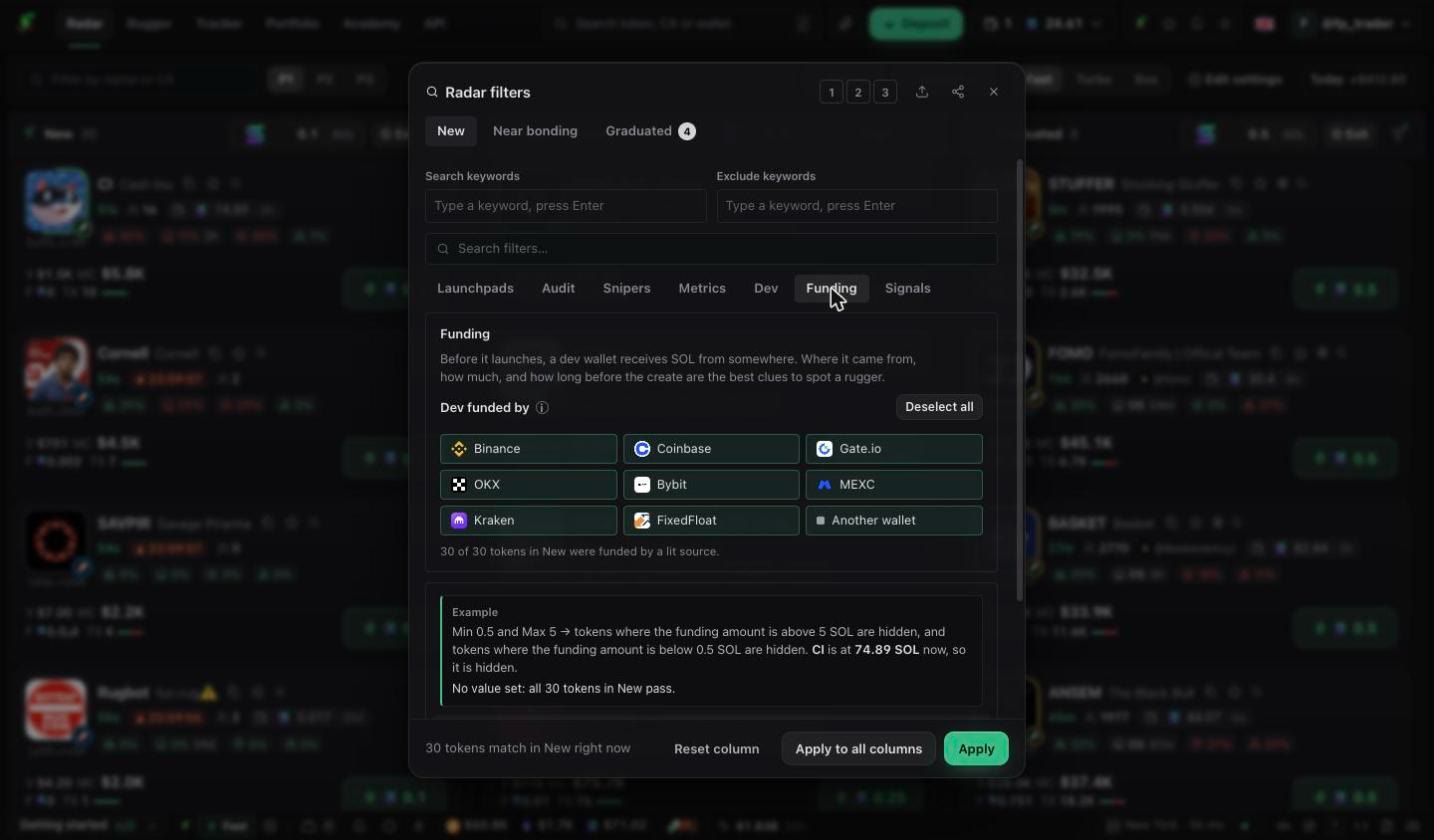
- 1Presets 1 / 2 / 3 · Import · Export
- 2Column tabs (with result count)
- 3Keywords to search / to exclude
- 4Sections: Launchpads, Audit, Snipers, Metrics, Dev, Funding, Signals
- 5Example on a live token: why this filter helps
- 6Reset · Apply to all columns · Apply
Launchpads
All on by default (Select / deselect all): Pump.fun, PumpSwap, LetsBonk, Bags, Moonshot, Believe, Boop, LaunchLab, Meteora, Jupiter, Heaven, Moonit, Sugar, Candle, Vertigo, Wavebreak, Printr, TokenMill, Raydium, Orca, StonkFun.
Exclude: Hide cashback tokens, Hide off-chain tokens (name and image can be changed later).
Filter presets: click an empty slot = saves the filters of all 3 columns; click a filled slot = loads; Shift+click = overwrites. Export / share copies the JSON: send it to a friend, they use Import.
Blacklist
Blacklist button: matching tokens never show up in your Radar again. Types: dev address, CA, keyword, X link (with an optional label). Import / Export as JSON. From a token page, you can also blacklist the dev in one click.
Display
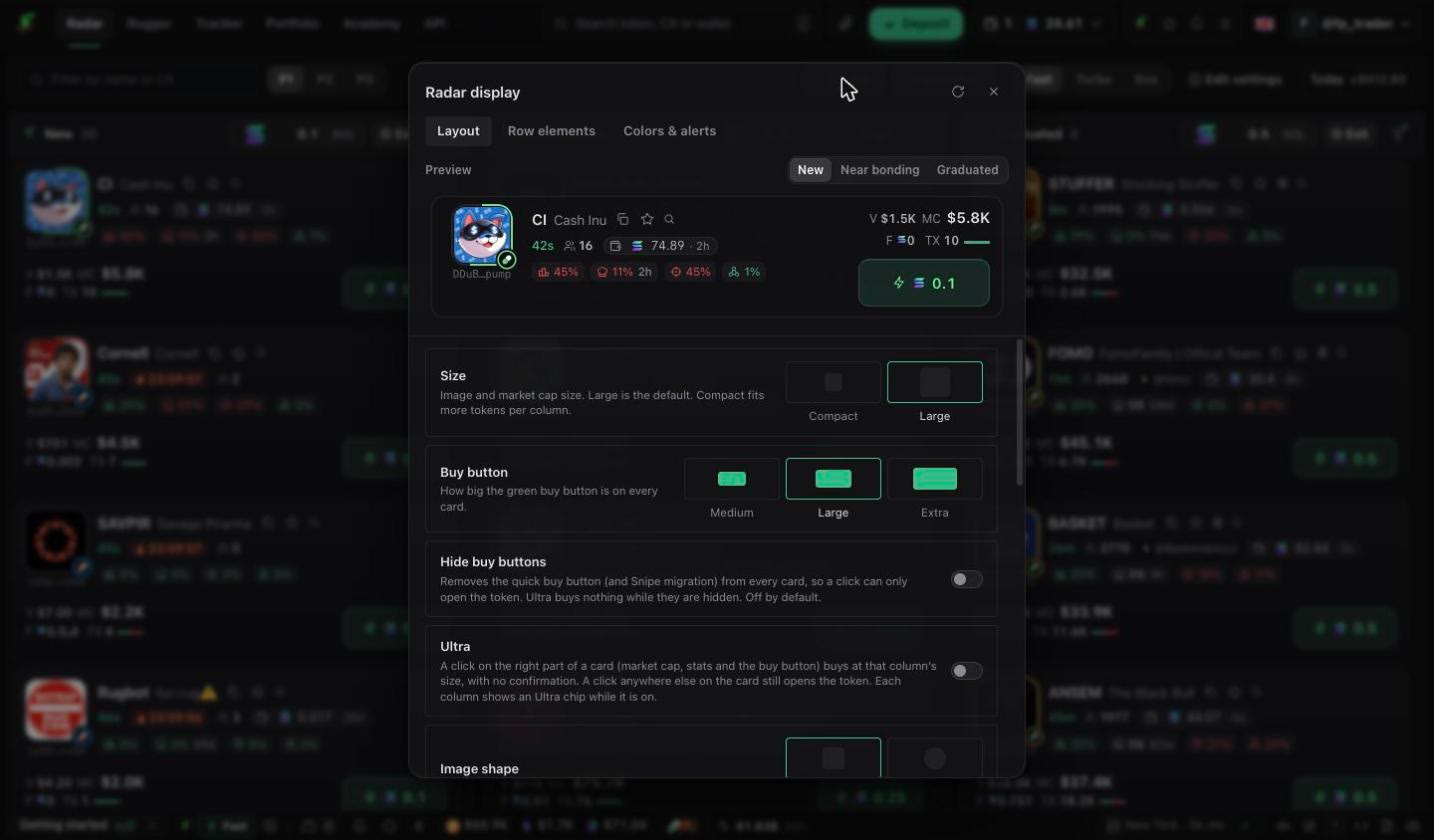
- 1Layout · Card items · Colors and alerts
- 2Hide buy buttons, Ultra…
- 3Live preview
Display button (live preview, Reset button).
| Tab | Options |
|---|---|
| Layout | Size Compact / Large · Buy button Medium / Large / Extra · Hide buy buttons · Ultra · Square / round image · Bonding ring / hidden · Exact / rounded MC · Bonding % on hover · Bonding fill · Hover preview · Linked post under the card · Clickable dev funding · Column tint · Neon progress · Neon names |
| Card items | Show/hide each item: volume, fees, TX, 5m net buy, holders, pro traders, dev creations/migrations, tracked buyers, audit pills, funding exchange/amount/time, contract, X link. MC, age and buy button always stay. |
| Colors and alerts | MC colors (gray under $10K, white under $30K, green above) · Sound on each match (Near bonding / Graduated) · audit color thresholds |

Each column has its own filters and its own size. Keep strict filters on New (bundles, dev funding) and a bigger size on Graduated.