Portfolio

Your positions, your day-by-day PnL, and what to fix. Shortcut: P.
At the top: wallet picker (“All wallets” or a single one), search (paste a wallet address to analyse it), period 1D / 7D / 30D / All, USD/SOL currency, Positions and Wallets tabs.
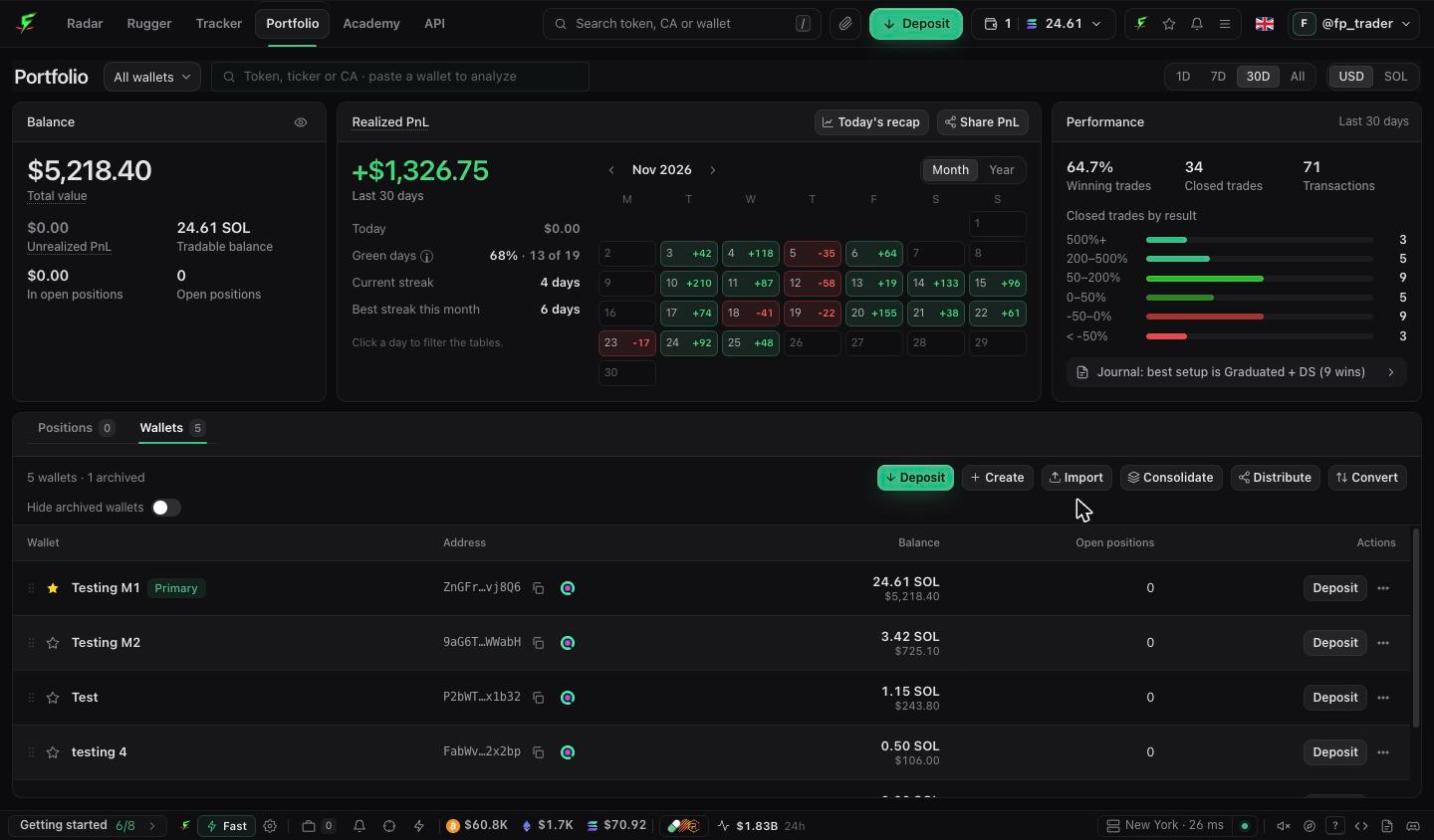
- 1Balance: total value, unrealized PnL, tradable balance (eye = hide)
- 2Realized PnL: period, today, green days, streak · Today’s recap · Share PnL
- 3PnL calendar (month / year): click a day = filter
- 4Performance: % winners, closed trades by result, Journal
- 5Open · Closed · Orders · History · Recent PnL · Transfers
The top strip
- Balance: total value, unrealized PnL, tradable balance, in open positions. The eye hides the amounts for a screenshot.
- Realized PnL: over the period and today, green days (% and n of n), current streak, best streak of the month. Today’s recap and Share PnL buttons.
- PnL calendar: month view (Monday first) or year view. Each day in green or red with the amount. Click a day: every table filters to that day (“Clear day filter”).
- Performance: % of winning trades, closed trades, transactions, and the breakdown of closed trades (500%+, 200–500%, 50–200%, 0–50%, -50–0%, below -50%).
The position tabs
| Tab | Columns / actions |
|---|---|
| Open | Token (buys · sells), bought, sold, remaining, PnL %, entry → current MC, wallet. Sell 100%, menu: PnL card, Burn dust (closes the token account, recovers the rent), hide the token. |
| Closed | Invested, sold, PnL, average entry MC, average sell MC, wallet, date. Journal tags and a Why it lost button on losses. |
| Orders | Your Limit / DCA / Event orders, trigger, size, status, Cancel. |
| History | Every transaction: type and reason, amount, MC, status (Confirmed / Failed · slippage), wallet, time, Solscan. 200 rows max. |
| Recent PnL | Invested, sold + held, PnL, buys, sells. |
| Transfers | SOL/token ins and outs, counterparty, Solscan. |
Filters: hide positions under $1, hide spam tokens, show hidden tokens, show failed transactions. Sort: value, most recent, PnL $, PnL %.
Bot equivalents: 📊 Positions and 📜 History.
The Journal: “Why it lost”
On a losing trade, Why it lost opens a “Why X lost $y” sheet:
- Reasons detected automatically: Entered late (entry above 2× the first candle), TP too high (the token didn’t do 2×), Size too small for fees (under 0.15 SOL).
- Tags: Entered late, TP too high, Dumped in dev slot, Size too small for fees, Rugger changed pattern, Good read. Plus a free note.
- The Performance strip sums it up: “Journal: top mistake is …” or “n losing trades to review”.

“One losing trade read well teaches you more than ten winners.” Every week: 7D period, read the calendar, open the Journal. (Academy, level 7)
Recap
Today’s recap (or Account › Today’s recap): Day or Week. Realized PnL, open positions, trades, Block 0 fills, closes, tracked moves, best and worst trade (with Why it lost). The week adds your most frequent mistake. Share card turns it into a PnL card.
The recap stays on the terminal: the bot doesn’t send it.
Analyse any wallet
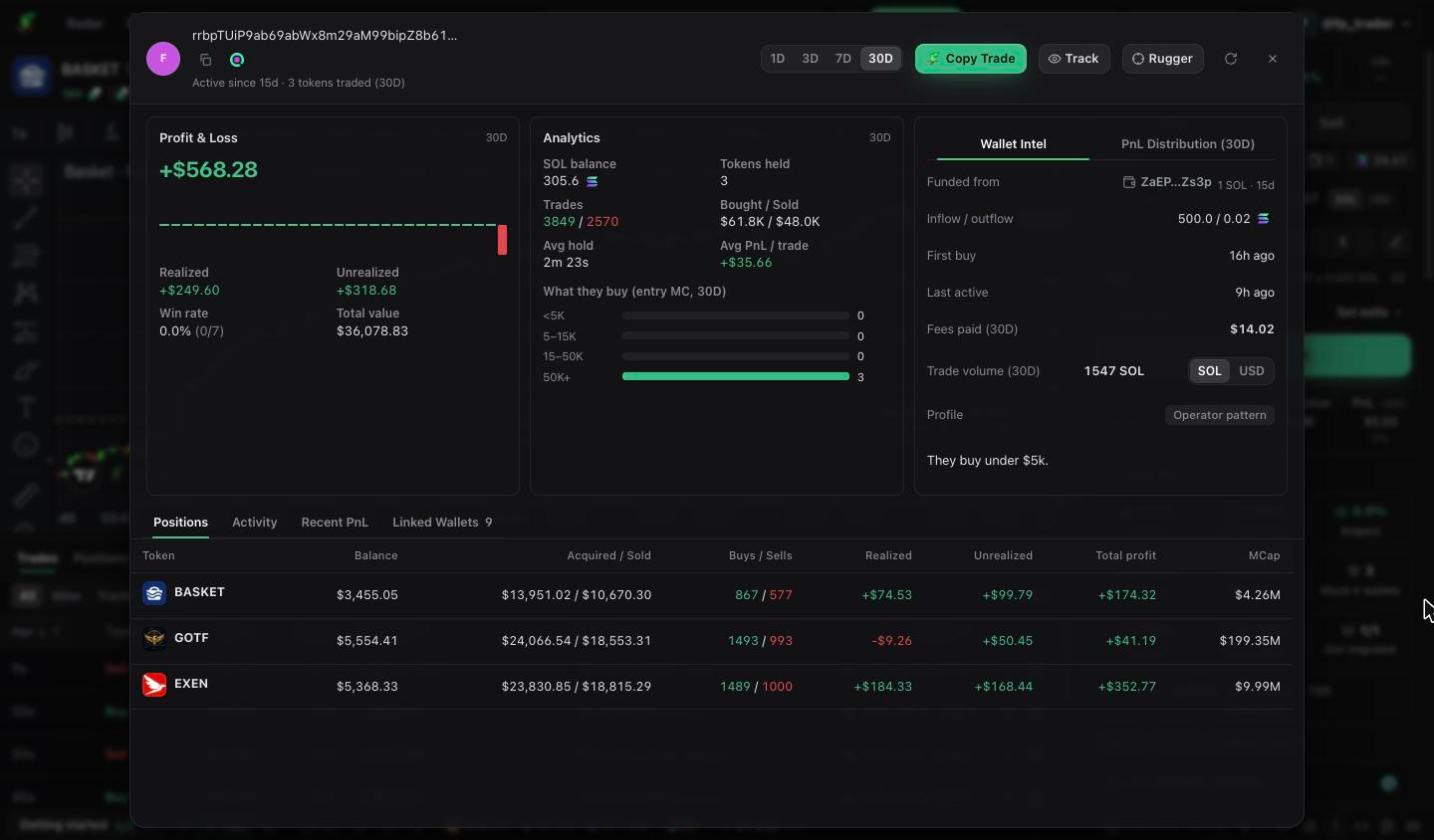
- 1Tags, period, Copy Trade, Track
- 2Profit & Loss
- 3Analytics
- 4Wallet Intel
Click an address anywhere (or paste it in the search): the wallet sheet opens.
- Tags (NEW, B0, BND…), active since, tokens traded, 1D/3D/7D/30D window.
- Profit & Loss, Analytics (what it buys by entry MC), Wallet Intel (funded by, first buy, fees paid, operator pattern), PnL distribution.
- Tables: positions, activity, recent PnL (with Share), linked wallets (same funder, same launches, same block, repeated transfers).
- Copy Trade (to the bot, alerts only), Track (Tracker), Rugger (analysis) buttons.