Buy Modes — Simple vs Hardcore
You now have two execution modes for your buys, configurable by rugger: Simple (default) and Hardcore. Both modes use the same multi-nonce infrastructure — the difference is only in fee and compute aggressiveness.
The infrastructure behind it: Multi-Nonce
Before talking about the modes, understand the infrastructure. On Solana, the leader role (the validator that produces the next block) rotates geographically every ~400ms among validators around the world. If your transaction is sent from a server far from the current leader, you lose the race to someone better positioned.
F Project solves this problem with a multi-nonce infrastructure across 5 bare-metal servers distributed across all validator zones:
🇺🇸 US-NW    (New York)
🇺🇸 US-LAX   (Los Angeles)
🇩🇪 EU-FRA   (Frankfurt)
🇳🇱 EU-AMS   (Amsterdam)
🇯🇵 ASIA-TYO (Tokyo)
With each buy, 5 transactions are sent in parallel — one from each server, each with its own durable nonce. The first one to reach the current Solana leader gets through and consumes its nonce. The other 4 automatically become invalid (their nonce no longer matches) → no double-fill possible, no risk of double buying.
Instead of 1 chance to be the fastest, you have 5. On every snipe.
⚡ Multi-nonce is active everywhere — new token creation, copytrade, quick buy. It’s the base infrastructure. Buy modes just describe how aggressively you send your transactions on top of this infrastructure.
Simple vs Hardcore — the recap
| 🎯 Simple | 🔥 Hardcore | |
|---|---|---|
| Multi-nonce 5 servers | ✅ | ✅ |
| Priority fee + tip | Auto (live network) or your fixed SOL | Auto outbid of other snipers |
| Max priority per buy | Your settings | 0.025 SOL (cap) |
| Max tip per buy | Your settings | 0.002 SOL (cap) |
| Compute Unit on PumpFun | 120,000 (generous) | 95 000 (tight) |
| Compute Unit on PumpSwap | 150 000 | 150 000 |
| Transaction fail rate | Low | Higher (CU exceeded) |
One-liner : Simple = multi-region speed at Auto or your fees. Hardcore = multi-region speed at maximum aggressiveness (outbid other snipers + reduced CU on PumpFun).
🎯 Simple Mode (default)
This is the default mode on all your ruggers. Priority and tip default to Auto — they follow live network fees (see 💰 Buy Config → Gas). You can still pin a fixed SOL amount. Simple does not outbid other snipers; it only pays what Auto (or your number) says.
The compute unit limit is generous : 120,000 CU on PumpFun, 150,000 on PumpSwap. That means your transactions have enough budget to execute even if the path is heavy (cashback, Token-2022, etc.).
For whom : “calm” trading. You accept that you won’t always win the race against the most aggressive snipers, but you want your buys to go through. Ideal for copytrades of wallets whose long-term performance you follow, where missing a trade doesn’t break the thesis.
🔥 Hardcore Mode
Hardcore is maximum aggressiveness.
What changes :
- Dynamic outbid — the system monitors other snipers’ fees on the token in real time and always places you above them. Minimum bump: +15% or +0.0005 SOL (whichever is higher), on top of your configured floors.
- Safety caps — even while outbidding, you are protected:
- Max priority fee per buy: 0.025 SOL
- Max tip per buy: 0.002 SOL
- Worst case per buy: ~0.027 SOL in fees (in addition to the amount you want to buy)
- Reduced Compute Unit — 95,000 CU on PumpFun (instead of 120k). A lighter transaction = faster to schedule by the leader = you win the race more often.
The trade-off: more failed transactions
The downside of reduced CU: on PumpFun, some Hardcore transactions will fail. Specifically with a “compute budget exceeded” error — the transaction did not have enough budget to execute because the path was heavier than expected (token with extensions, additional validations, etc.).
It’s the price to pay for having the lightest possible transaction and winning the race in block 0.
Your funds are protected
This is the most important point to understand:
A failed transaction = no SOL taken (except ~0.000005 SOL base fee on Solana, negligible).
You don’t buy the token, but you also aren’t charged your buy amount or your priority fees. You can try again immediately or switch to Simple for this rugger.
Hardcore confirmation
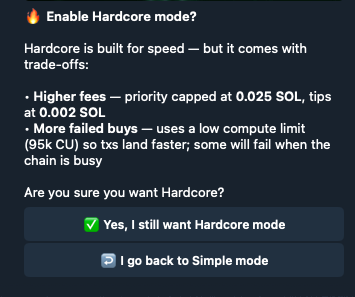
When you activate Hardcore for the first time on a rugger, F Project shows you a warning screen reminding you of the trade-offs: higher fees (capped) + more buys failing because of reduced CU.
You confirm with Yes, I still want Hardcore mode or you go back to Simple with I go back to Simple mode.
Where to configure
The buy mode is set per rugger, in the rugger’s main config section:
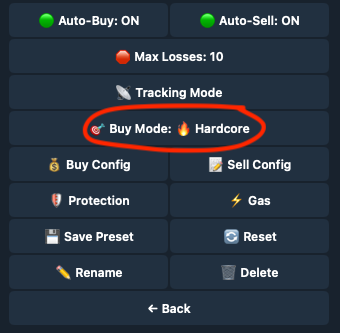
You can clearly see in the menu:
🎯 Buy Mode: Simple(default)🔥 Buy Mode: Hardcore(after activation)
Click the line Buy Mode to switch. If you switch to Hardcore, the confirmation screen appears before validation.
When to use which
Stay on Simple if :
- You’re just starting on F Project — it’s the safe mode, understand the basics before going further
- You trade “calm” ruggers where block 0 is not critical
- You want maximum predictability (your fees, your parameters, no surprises)
Switch to Hardcore if :
- You’re on a race-to-block-zero rugger where the first seconds make all the difference
- You accept losing ~20-30% of trades to win the juiciest ones
- You trade competitive ruggers where other snipers also use aggressive engines
Common hybrid setup : Simple on most of your ruggers, Hardcore on the 2-3 most profitable ruggers where the race is tight.
⚠️ Key takeaway
- ✅ Both Simple and Hardcore use the 5 multi-nonce servers — no infrastructure difference
- ✅ A Hardcore tx that fails = you are NOT charged your buy amount or the fees
- ⚠️ Hardcore = more failures on PumpFun because of 95k CU (vs 120k in Simple)
- ⚠️ Hardcore can consume up to 0.027 SOL in fees per buy (absolute cap, excluding Bribe)
- 🔧 If you see too many failures on a rugger in Hardcore, switch back to Simple — it’s probably a rugger whose tokens have paths that are too heavy for 95k CU
Related pages:
- 💰 Buy Config — amount, Wait for their buy, Auto gas
- ⚙️ Per-Rugger Config — overview of settings
- 📉 Buy the Dip — automatic DCA in case of a dump