My ruggers: your bot’s trackers from the web
Rugger › My ruggers shows your Telegram bot’s trackers: the same ones as in 🎯 Ruggers. You can read them, see their results and, if web editing is on for your account, change them.
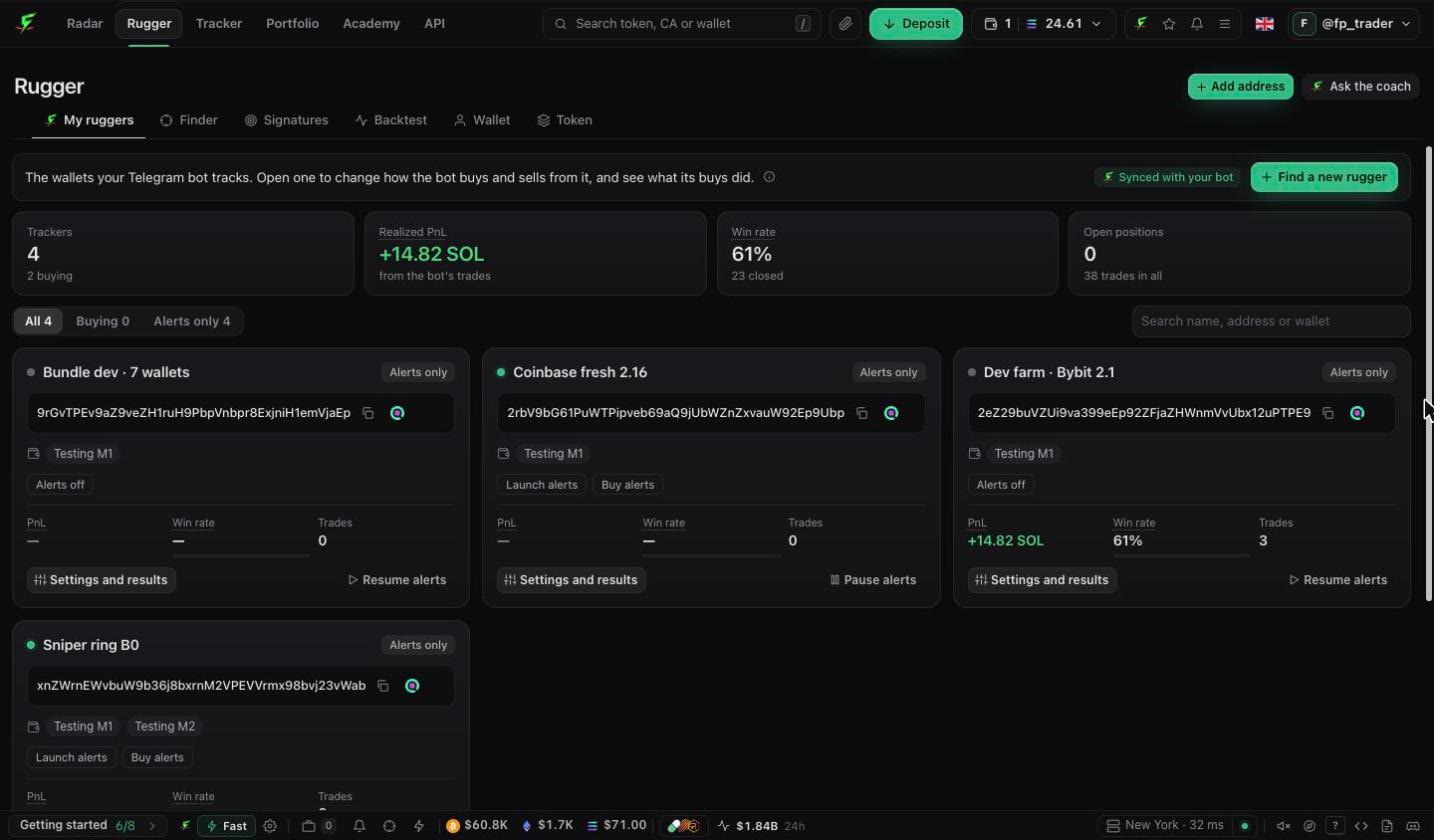
- 1Synced with your bot / Read from your bot
- 2Trackers · Realized PnL · Win rate · Open positions
- 3Filter: All / Buying / Alerts only
- 4Card: address, wallets, triggers, PnL, win rate
- Synced with your bot chip (editing) or Read from your bot (read-only).
- KPIs: trackers (of which buying), realized PnL (from the bot’s trades), win rate, open positions.
- Each card: address, bot wallets, triggers (Snipes launches / Copies buys / Copies sells, or alerts), PnL, Settings and results, Pause alerts (alerts-only trackers).
The tracker editor
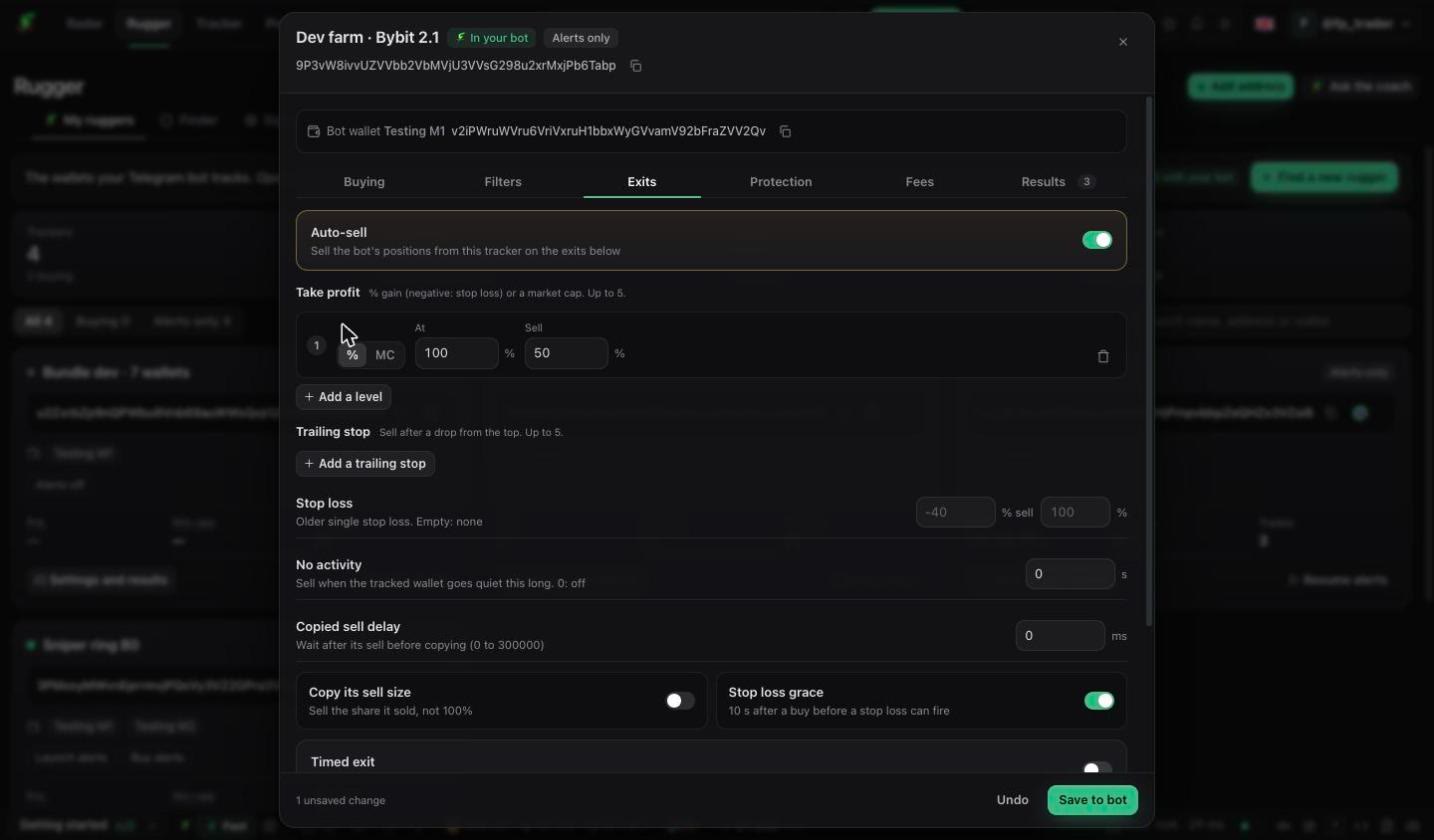
- 1State in the bot
- 2Tabs
- 3Settings
- 4Save to bot
Settings and results opens the editor. If the rugger is tracked in several bot wallets, pick the wallet: each one keeps its own settings.
- 1Tracker status in the bot
- 2Buy · Filters · Exits · Protection · Fees · Results
- 3Settings
- 4Save: confirmation + password code if it touches money
| Tab | Settings | Bot docs |
|---|---|---|
| Buy | Auto-buy, name, triggers (launches a token, buys, sells, dev sells + % range), amount (empty = 0.001 SOL), buy once (per tracker / whole wallet), Wallet default / Normal / Hardcore mode, loss limit 1–20, Buy the dip up to 3 levels. | Buy Config, Buy only once, Buy Modes, Max Loss Counter, Buy the Dip |
| Filters | Min/max MC, wait for an MC, snipe delay, max token age, size of their buy, cooldown, gap between launches, wait for their buy to land, platforms (Pump.fun, PumpSwap, StonkFun, custom pairs). | Limits, Launch venues |
| Exits | Auto-sell, up to 5 TPs (% or MC), up to 5 trailing, stop loss, no activity, copied sell delay, copy their sell size, 10 s SL guard, timed exit, sell on big buy, front-run. | Sell Config, Sell after entry, Auto-Sell on Big Buy |
| Protection | Rugger protection, Simple / Last transfer / Hybrid mode, transfer ranges (up to 5), keep the address, fresh wallets only, spider scheme, funding delay, remove if no launch, remove after the first action. | Rugger Protection, Modes, Funding delay |
| Fees | Buy and sell priority / tip (empty = auto), bribe $1–30. | Buy Config › Gas |
| Results | Realized PnL, win rate, trades, spent, list of trades with exit reason. | History |
Saving: the confirmation and the code
Save to bot shows “n unsaved change(s)”. If the change turns on buying or touches a buy setting, a red confirmation appears: “Turn on buying in your bot” / “Change how your bot buys”, with the wallet, each buy, the dip buys, “plus fees and tips”, and Confirm: n SOL per buy.
Changes that touch money ask for your password code (the same as for a withdrawal), and your 2FA code if you protect withdrawals. A refused code is asked again.
The editor is locked (read-only) if web editing isn’t on for your account, if the wallet is frozen pending fees, or for an amount signature row.
Copy groups
Below My ruggers. A group brings together wallets that often buy the same tokens. With K of N, your bot buys only after K of them have bought. See also 📁 Groups and New tools.
| Tab | Settings |
|---|---|
| Members and buy | Name (24), members (up to 100 addresses), K members needed, amount (empty = 0.001 SOL, max 100). |
| Filters | Max MC, max token age (up to 1440 min). |
| Exits | Up to 5 TPs, up to 5 trailing, no activity. Doesn’t change positions already open. |
| Fees | Priority, bribe (empty = wallet value). |
- 5 groups max per bot wallet; they share the tracker slots.
- No pause: empty the members or delete the group. Deleting stops the buys; positions keep their exits.
- Starting or changing a group’s buys asks for the same confirmation + code.
Add a rugger from the web
From Rugger (Copy Trade, Signatures, Backtest), the Tracker or a wallet sheet, Track in your bot adds the wallet to your bot alerts only. You turn on buying afterwards (in the editor or in the bot).

One wallet per network. Never copy several wallets from the same operator: your bot would buy once per wallet on the same token. (Academy, level 4)