Exits: TP, SL and the exits editor

An exit strategy tells the server when to sell your bag: take profit, trailing stop, stop loss, no activity, dev sell… It runs on F Project’s side, not in your browser.
You can set exits in three places:
| Where | What for |
|---|---|
| Radar › Exit (per column) | Every one-click buy from that column gets these exits. |
| Token page › Auto Sell | Exits set as soon as this buy lands. |
| Token page › Bag exits | Edit the exits of a bag that’s already open. |
TP/SL lines on the chart
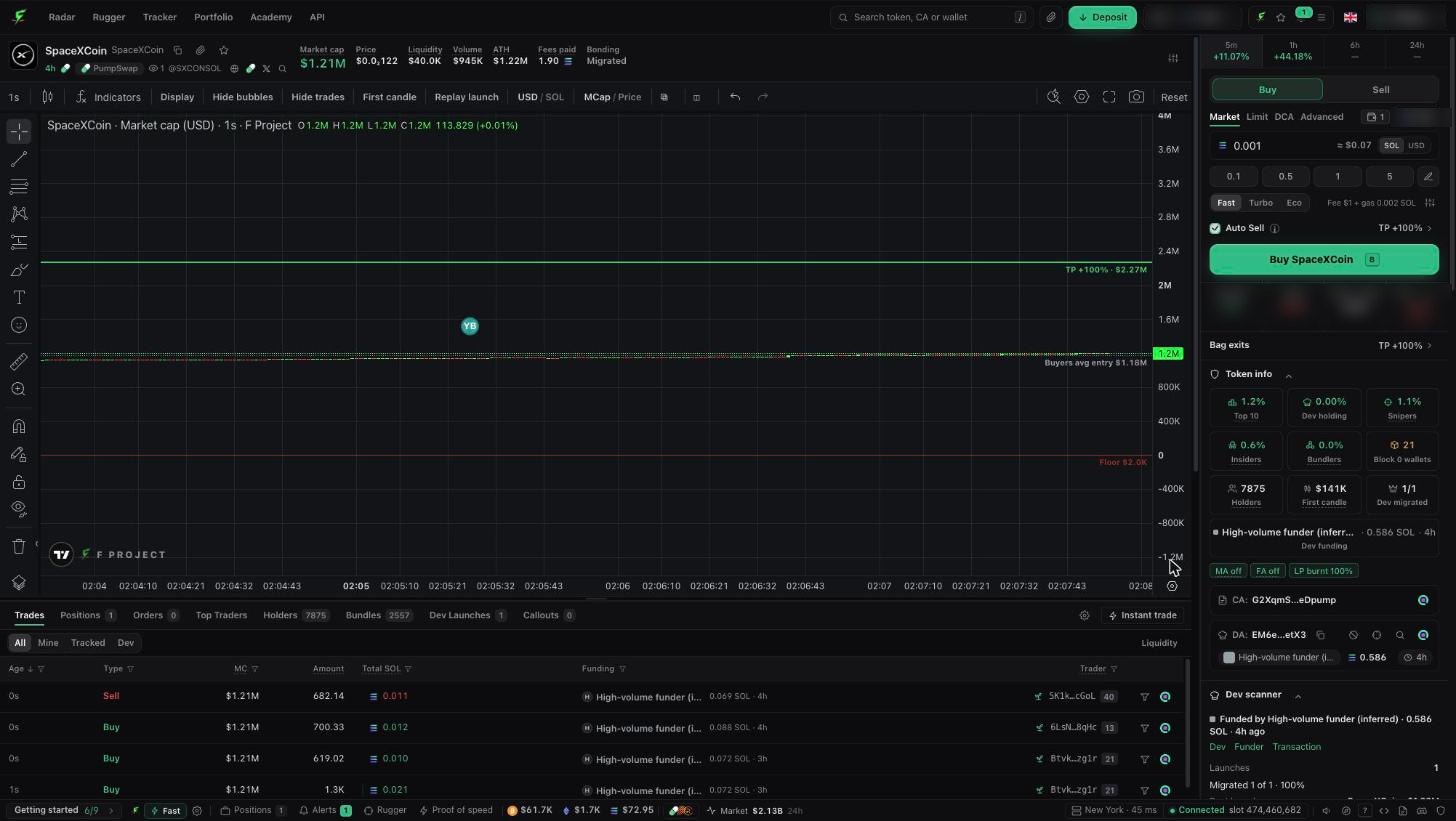
- 1TP line: drag it
- 2Floor: the launch price, your worst case
When you hold a bag with server exits, the chart shows your lines: green for each % TP, red for the SL. Example: “TP +100% · $120K”, “SL -30% · $42K” (“sells n%” if the level doesn’t sell everything).
Dragging a line moves it:
- The new level goes to the server when you let go (or 1.5 s after the last move), rounded to a whole % from the entry MC. No confirmation.
- Toast: “Take profit moved to 150%” then “MC $… Updating your exits on the server.”
- A TP must stay above your entry, an SL below: otherwise the line snaps back.
- The old strategy is cancelled only after the server confirms. No answer within 12 s: “The server did not confirm the new exits. The previous ones stay armed.”
The exits editor
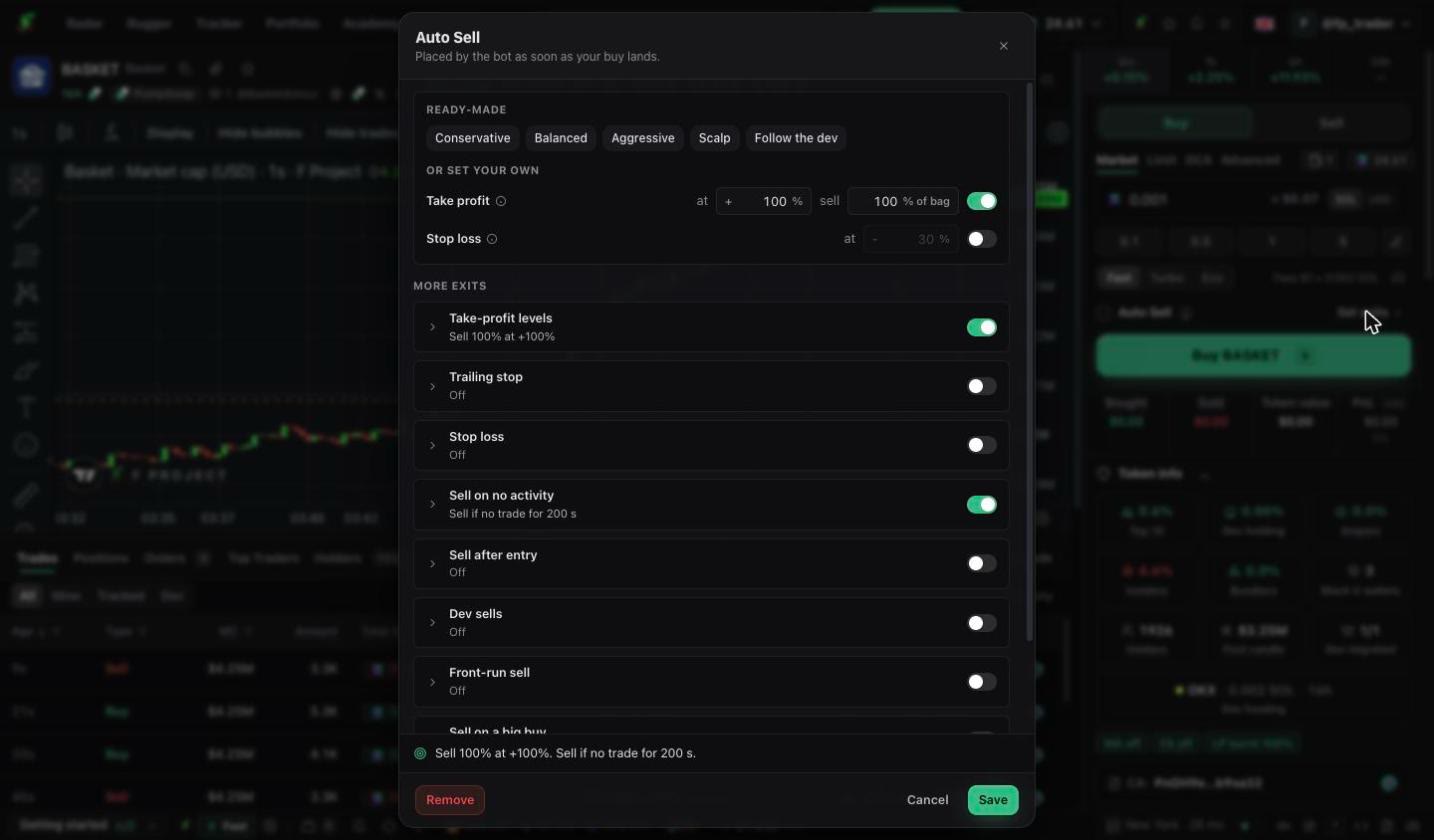
- 1Ready presets: Conservative, Balanced, Aggressive, Scalp, Follow the dev
- 2Take profit: at +% or at a market cap, sells % of the bag
- 3Trailing stop: % from the high, activation
- 4Stop loss + 10 s guard
- 5No activity, after entry, dev, front-run, big buy, migration
- 6Plain-language summary · Delete · Cancel · Save
Ready presets
| Preset | Rule |
|---|---|
| Conservative | +10% sells 100%, SL -30%. |
| Balanced | +15% sells 50%, +50% sells 100%, SL -40%. |
| Aggressive | Trailing 25%, no activity 30 s. |
| Scalp | SL -5% with no guard, sells 100% 8 blocks after the buy, price first. |
| Follow the dev | Sells the same % as the dev, 200 ms delay. |
The rules
| Rule | Settings |
|---|---|
| Take profit | Per level: triggers on % gain or on market cap (accepts 50k, 1.2m), sells % of what you have left. Initials chip = sells just your stake. TP and SL share 5 levels in total. Set the last level to 100%. |
| Trailing stop | Up to 5 levels: ”% from the high” drop, % sold, activation MC (0 = from the start). |
| Stop loss | -% trigger, % sold, 10 s guard (protects against “ghost” wicks, on by default). |
| No activity | Sells if nobody trades for X s. Default 200 s; warning below that. |
| After entry | In blocks (1–75, ~200 ms each) or in seconds (1–1800), from your buy or from launch. “Clock only” or “Price first”. Up to 5 steps. |
| Dev sells | Sell everything, or the same % as the dev. Delay 0–300,000 ms. |
| Front-run sell | The dev gathers ≥ X% of their supply in one wallet (default 50%) → sells. See Front Run Sell. |
| Sell on big buy | Up to 3 SOL ranges, % sold, min fees (against fake big buys). See Auto-Sell on Big Buy. |
| Migration | Sells 100% on migration. |
At the bottom, a plain-language summary reads your strategy back. Save is blocked if: no valid TP, more than 5 TP+SL levels, overlapping ranges, delays out of range.
Why no fixed stop loss on pump.fun? A pump.fun token doesn’t go below its launch price (~28 SOL MC): that floor already caps your worst case. A fixed stop can trigger in the middle of a pump. (Academy, level 1)
Bag exits
On the token page, with an open bag: Bag exits → “Exits on this bag”. The server holds your % TPs and your SL; drag their lines on the chart to move them.
- One strategy per wallet.
- Only % TPs and the SL are read back and drawn on the chart (not market cap TPs or the other rules).
Does it run when I close the browser?
Yes. Limit orders, DCA, events and TP/SL strategies are held by the server.
After a server restart, a TP/SL strategy stays on standby until you reconnect to the terminal. Open the terminal now and then if you have open bags.
“Sign out everywhere”, a password change or a detected session theft cancel your armed orders and strategies. A plain sign-out leaves them running.
For comparison: a rugger’s exits in the bot are set in Sell Config and Sell after entry, and on the web in the tracker editor.